
Lenovo in Brief - Overheating, Hinges and SSD Upgrades
The last few days in the Lenovo community have been dominated by technical problems affecting users of several popular laptop series - IdeaPad and Legion. From worryingly high CPU temperatures at idle, through mechanical hinge damage, to questions about upgrading the drive in a gaming Legion 5 - the theme of the week is diagnosing, repairing and upgrading hardware. If you are struggling with similar issues yourself, or simply want to know what to watch out for as a Lenovo laptop owner, this review is for you.
IdeaPad Slim 5 with Ryzen 7 AI 350 - idle temperatures of 90-100°C cause concern
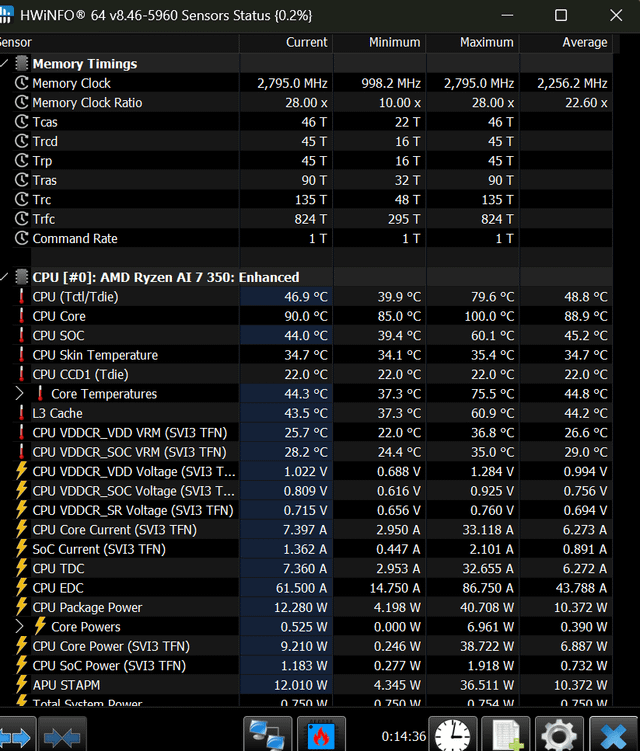
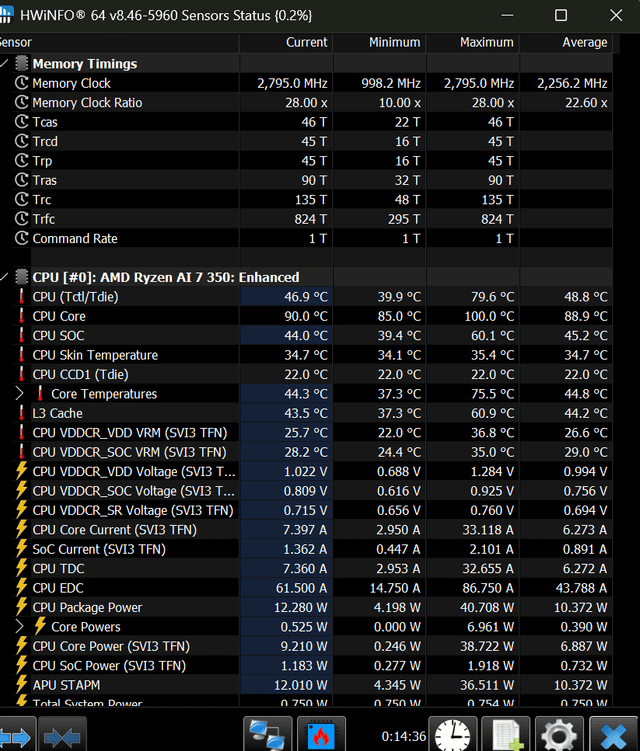
One user of the r/lenovo subreddit reported a surprising problem with their IdeaPad Slim 5 equipped with an AMD Ryzen 7 AI 350 processor. The laptop kept its core temperatures at 90-100°C even when it was not running any demanding tasks - that is, in the state known as idle. These are values that should normally appear only during intensive computing or gaming, not with a browser or the desktop open. Before you start looking for the cause on your own, our overheating diagnostics guide shows step by step how to check whether it is dust, dried-out thermal paste or a faulty fan.
Correct idle CPU temperatures are usually in the range of 40-60°C, depending on the cooling system model, the environment and system settings. Values exceeding 90°C with no load at all are a warning sign that can point to several different causes: incorrect behavior of the power management software, blocked or clogged ventilation openings, poorly applied thermal paste, or a problem with the processor's power delivery itself.
It is worth noting that the problem concerns a laptop equipped with a processor from the AMD Ryzen AI series - a relatively new generation of chips that integrate a dedicated block for artificial intelligence computing (NPU). Processors of this kind may behave differently from previous generations when it comes to heat management, especially if the system software or drivers are not fully mature.
The Reddit community suggested several diagnostic steps: updating the BIOS and AMD drivers, checking the power profile settings in Vantage (the Lenovo app), and physically cleaning the air intakes. If none of these steps help, the problem may lie deeper - for example, in poor contact between the heatsink and the processor, which in new-generation laptops can be harder to diagnose on your own.
For IdeaPad Slim 5 owners this is an important signal to monitor temperatures regularly with tools such as HWiNFO64 or Lenovo Vantage and not to downplay anomalies - especially when the laptop is relatively new and still under warranty.
Source: r/lenovo - Reddit
Damaged hinge in an IdeaPad 5 - what to do when the casing cracks at the hinge?

Another post that caught the community's attention concerned an IdeaPad 5 with clearly visible mechanical damage. The user nicknamed fatherhelo posted a photo showing that the metal elements of the hinge mechanism protrude beyond the casing, and the plastic cover around the hinge is open or cracked. This kind of problem is one of the most frequently reported in repair shops for laptops from the budget and mid-price segments.
Hinges in laptops are a component that, with everyday use - opening and closing the lid dozens of times a day - is subjected to constant mechanical stress. In cheaper models the casings are made of plastic, which over time loses elasticity and may crack at the hinge mounting points, especially if the lid is opened too abruptly or at an unnatural angle.
The described problem can have several sources: a factory defect (the hinge attached to the casing too weakly), damage during transport, or natural wear of the material under intensive use. Regardless of the cause - protruding metal hinge elements are a serious signal not to delay the repair. An open casing exposes the internal components to dust, moisture and mechanical damage, and a hinge without a stable mounting can quickly lead to damage to the cables passing through the rotation mechanism (display cables, Wi-Fi antenna cables).
In the case of such damage, users have several options: report it to an authorized Lenovo service center (if the laptop is under warranty), replace the hinge and/or the display back cover (LCD cover) themselves, or use the services of an external repair shop. It is worth knowing that original hinges, covers and casings for IdeaPad models are available as spare parts - which makes repair economically justified compared with buying new hardware. You can find matching spare parts for the IdeaPad 5 14 (hinges, LCD cover, casing) on our model page.
Source: r/lenovo - Reddit
Lenovo Legion 5 15AKP10 - how and where to replace the SSD with a 2TB one?
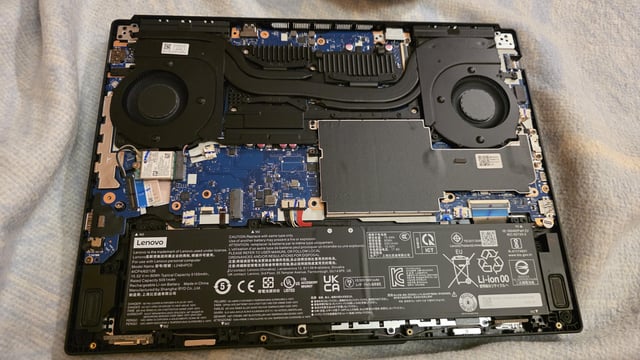
The third topic discussed concerns the Lenovo Legion 5 in the 15AKP10 variant - a gaming laptop whose user wants to upgrade it with a larger SSD. The owner of the device, which came from the factory with a 500 GB drive, has already ordered a Kingston KC3000 drive with a capacity of 2 TB and asks the community about the location of the M.2 slots in this model and whether the drive will make full use of its speed capabilities.
The Legion 5 15AKP10 is a model based on the AMD platform, equipped with two M.2 slots. The first slot, supporting the PCIe 4.0 x4 interface, is usually occupied by the factory drive and allows full use of the speeds of premium NVMe drives - and the Kingston KC3000 is exactly such a drive, reaching sequential read speeds of around 7000 MB/s. The second slot may support a slower interface (PCIe 3.0 or even SATA), which means that the choice of slot has a significant impact on the results obtained.
The user rightly pointed out the issue of double-sided modules. Drives such as the KC3000 2 TB may have NAND memory chips on both sides of the printed circuit board. In some laptops the M.2 slot does not have enough space or a suitable socket to properly install a double-sided drive - this may make it impossible to close the cover or cause contact problems. Before buying, it is worth checking the slot specification and its height limits (type 2280 single-sided vs. double-sided).
In practice, replacing the drive in the Legion 5 is a relatively simple operation for people with basic service experience: you need to unscrew the bottom cover, gently pry it open, then unscrew the screw securing the M.2 drive and take it out of the socket. It is worth remembering to discharge static electricity, and that it is a good idea to clean the fans while you are at it. Before the replacement you should also take care of a clone or backup of the system.
This kind of upgrade is one of the most cost-effective investments in a gaming laptop - a larger SSD means not only more space for games, but also faster scene loading and generally smoother system performance.
Source: r/lenovo - Reddit
Laptop overheating - is it the hardware or the software?
The problem of high temperatures in laptops with modern AI processors is a topic that appears more and more often on technical forums. Processors such as the AMD Ryzen 7 AI 350 are designed for dynamic power scaling - which means they can briefly draw a significant amount of power, generating quite a lot of heat, even if nothing special is happening on the screen. This happens because system processes, file indexing, antivirus scanning or cloud synchronization tasks may be running in the background.
However, temperatures of 90-100°C in a state of genuine idle - when the user clearly sees no activity in Task Manager - are a different situation, one that requires intervention. The first steps are always a BIOS update (manufacturers regularly release fixes related to thermal management), updating the chipset and AMD drivers, and resetting the power profile settings to their default values.
If the software is not to blame, the problem may lie in the physical layer: incorrect application of thermal paste at the production stage happens even with well-known manufacturers. In such a case, reapplying high-quality paste can lower temperatures by 10-20°C. It is also worth checking whether the fans actually spin and whether the ventilation grilles are not blocked.
Source: r/lenovo - Reddit
Hinges in budget laptops - a weak point and how to deal with it
Hinge damage is one of the most common reasons a laptop ends up in a repair shop. This applies especially to devices from the popular segment, where manufacturers save on the thickness of the casing plastic and the quality of the lid rotation mechanism. In models such as the IdeaPad 5 the hinge is attached to the casing with screws driven into plastic brackets - and it is precisely these brackets that can crack over time, causing the effect described by the user fatherhelo.
Prevention is key here: always open the laptop with both hands (grasping the middle of the lid, not a corner), avoid abrupt movements and do not place heavy objects on a closed laptop. If you notice that the lid resists when opening or you hear cracking sounds around the hinges - that is a signal to act before full damage occurs.
The good news is that hinges and casings for popular IdeaPad models are widely available as spare parts. Replacing a damaged hinge or LCD cover is a repair that an experienced technician performs within an hour, and the cost of the parts is many times lower than buying a new laptop. The key, however, is to use original components - low-quality replacements can lead to renewed damage after just a few months.
Source: r/lenovo - Reddit
SSD upgrades in gaming laptops - what to look out for?
Replacing or upgrading an SSD is one of the modifications of gaming laptops that users most willingly carry out. In the case of the Lenovo Legion 5, access to the M.2 slots is relatively convenient - you only need to remove the bottom cover. If the cover latch gets damaged during disassembly, we have an original bottom casing for Legion 5 15 IRX10 / IAX10 / AKP10 / AHP10. However, it is worth downloading the service diagram (Hardware Maintenance Manual) for your specific model variant from the Lenovo website beforehand, since different revisions may have a slightly different component layout.
When choosing a drive for a gaming laptop, three parameters are crucial: the interface (PCIe 4.0 x4 for maximum speed), the format (M.2 2280 is the standard in this class of devices) and whether the drive is single-sided. This last aspect has practical significance - in slots with limited space a double-sided drive may not fit or may cause thermal problems, because its NAND chips are closer to the socket surface.
The Kingston KC3000 2 TB is a solid choice for a demanding user - the drive offers speeds at the level of top consumer NVMe drives and is compatible with AMD platforms. If the Legion 5 15AKP10 has a PCIe 4.0 x4 slot as its main one, the KC3000 will make full use of its potential. In the case of the second slot (if available) you should expect bandwidth limitations, which is worth taking into account when deciding which slot to use for the new drive and which to leave for the factory system drive.
Source: r/lenovo - Reddit
Summary of the week - diagnose, repair, upgrade
The topics of the last few days in the Lenovo community clearly show that users are increasingly willing to get involved in diagnosing and repairing their own hardware. Whether it is about monitoring temperatures in a new IdeaPad Slim 5 with Ryzen AI, a mechanical hinge failure in an IdeaPad 5, or a well-thought-out drive upgrade in a Legion 5 - knowledge and access to the right parts are the key to extending the life of a laptop.
It is worth remembering that most of the problems described have practical solutions that do not require buying a new device. Regular maintenance, software updates and a quick response to the first symptoms of faults are the best way to enjoy a well-working laptop for many years.
If you already own a Lenovo laptop and are looking for original spare parts - casings, covers, bezels, keyboards, touchpads, fans, cables and other parts - visit www.abcdeal.pl. In our shop you will find original components for models from the ThinkPad, IdeaPad, Legion and ThinkBook series, thanks to which your hardware will serve you for many more years.
Sources:
- Ryzen 7 ai 350 heats up on ideapad slim 5 please help - r/lenovo
- how do i fix this üò≠ - r/lenovo
- Lenovo Legion 5 15AKP10 where is the drive located and how to replace it - r/lenovo
Parts for your Lenovo laptop - touchpad, keyboard
Message from: 24-05-2026