
Lenovo in Brief - ThinkPad T14 Gen 7 and the MacBook Fight

The past week brought a real mix of news from the Lenovo world - from an enthusiastic review of the ThinkPad T14 Gen 7 with its groundbreaking repairability, through the manufacturer's strategic moves in response to the Apple MacBook Neo, to everyday dilemmas of users dealing with flickering screens, stubborn BIOS updates and aggressive warranty notifications. And for dessert - a touching story about a cardboard ThinkPad and a young Linux beginner. Enjoy the read!
ThinkPad T14 Gen 7 - the new repairability champion
NotebookCheck has published an extensive review of the ThinkPad T14 Gen 7, naming it the new repairability leader among business laptops. This is a significant distinction at a time when manufacturers increasingly glue devices together and solder memory permanently to the motherboard.
The new generation uses Intel Panther Lake processors and modern LPCAMM2 memory, which replaces classic SO-DIMM modules. LPCAMM2 is a format that combines the energy efficiency of soldered memory with the possibility of replacement - users can upgrade or replace the module themselves, which until now was rare in the business ultrabook segment.
The ThinkPad T14 has long been one of Lenovo's absolute bestsellers on the corporate market, and the T14 Gen 7 continues this tradition with a raised technical bar. High repairability has a direct impact on TCO (total cost of ownership) in business environments - easier part replacement means lower service costs and a longer device life cycle.
Reviewers do point out one clear downside, however: the price. The T14 Gen 7 is not a budget proposition, and companies counting every zloty may feel discouraged. Even so, for organisations that value sustainability and equipment longevity, this investment may simply pay off.
Source: notebookcheck
Lenovo vs MacBook Neo - IdeaPad with Wildcat Lake enters the fight

Apple surprised the PC industry with the price of the MacBook Neo - a device with the A18 Pro chip launched at 600-700 dollars, turning the competition's calculations upside down. Ars Technica looked at how Windows computer makers are trying to respond to this challenge.
Lenovo is among the companies that have bet on Intel Core Series 3 processors codenamed Wildcat Lake. It is a budget chip built specifically for this price segment, using Intel's latest CPU and GPU architectures and the advanced 18A manufacturing process. According to Ars Technica, Lenovo plans to introduce new variants of the IdeaPad Slim series with exactly these chips.
Wildcat Lake is meant to answer a specific problem: existing Windows laptops priced at 600-700 dollars clearly lost to the A18 Pro in both performance and energy efficiency. Intel's new chip with the 18A process is supposed to change that, while also offering compatibility with the Windows ecosystem, which remains crucial for many users.
It is worth staying cautious, though - most of the announced Wildcat Lake systems do not yet have official prices, and some models are currently available only on the Chinese market. A realistic assessment of competitiveness against the MacBook Neo will only be possible after the global launch and the release of final price lists.
Source: arstechnica
Choosing a Yoga Slim - Intel, AMD or Aura Edition?

An interesting discussion flared up on r/lenovo about choosing between three versions of the Yoga Slim: the model with the Core Ultra 226V (Aura Edition), the variant with the Core Ultra 5 125H, and the AMD version with the Ryzen AI 5 340 or 430. The post author's dilemma is typical for many buyers - too much choice and non-obvious differences between versions.
The Yoga Slim 7i Aura Edition paradoxically offers a newer processor and two Thunderbolt ports at a lower price than the Core Ultra 5 125H model - which rightly raises the buyer's suspicion. The difference lies in the architecture: the 226V is a chip from the Lunar Lake family, designed for maximum energy efficiency, while the 125H is a more powerful chip with a higher TDP, better for sustained multithreaded workloads.
The AMD version in the tempting Tidal Teal colour catches the eye, but the user had heard that Intel Ultra processors currently outperform Ryzens in this class of devices. For someone who mainly does office work and does not play games, the differences in practice will be minimal - battery life and screen quality matter more here than raw benchmark results.
The discussion also revealed an interesting aspect of buying directly from Lenovo: the possibility of getting free accessories, but in exchange for only a one-year warranty. It is worth comparing this offer with buying from authorised resellers, where warranty terms may be more favourable.
Source: r/lenovo
Screen and BIOS problems - the community speaks
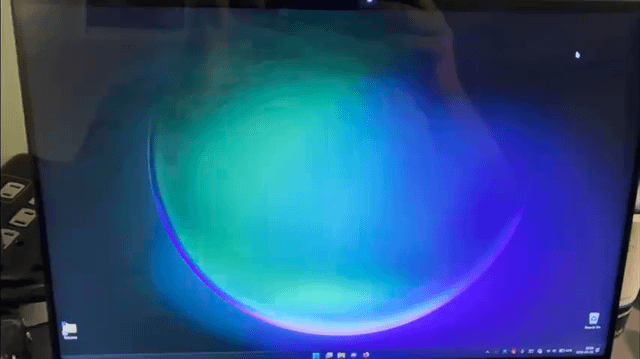
The past week brought several reports of hardware and software problems on the forums that are worth discussing. A Yoga Slim 7 user described worsening flickering and artefacts on the screen appearing after a few weeks of use. A characteristic diagnostic clue is the fact that external monitors work flawlessly - which points suspicion towards the panel itself or the internal connection, rather than the graphics card as such.
A similar thread concerned a newly purchased laptop with excessive screen brightness that could not be corrected in the settings. The user, unable to return the product to the seller, is looking for alternative solutions. A consultation with AI (Gemini) pointed to a fault in the physical panel - in such cases the only effective solution remains warranty service or replacing the display.
In a separate thread, the owner of a ThinkStation P3 Tower with the W680 chipset ran into trouble during an automatic BIOS update initiated by Lenovo Vantage. The process got stuck at 100% for many hours and the user wondered whether to disconnect the power - which can be risky in the case of a firmware update. Fortunately, ThinkStations have safeguards that protect the BIOS from damage if the procedure is interrupted.
A separate problem was reported by an IdeaPad Gaming 3-15ARH05 user, whose BIOS interface stopped displaying correctly after an update to version FCCN21WW. An attempt to reinstall the firmware from within Windows 11 ended with a message that the version was up to date, blocking any possibility of repair. It is a reminder that BIOS updates - although important - should be carried out carefully, preferably with the power adapter connected.
Source: r/lenovo, r/lenovo, r/lenovo, r/lenovo
Build quality and warranty - what to know before buying

Among the posts of the week there was no shortage of topics related to build quality and warranty policy. An IdeaPad Slim 5 Gen 10 user in the Cosmic Blue colour described worrying flaking of the paint on the casing - the device was only 1-2 months old, and the owner boasted of exceptional care for the equipment, even taking off his watch while working to avoid scratches.
Problems with the coating appeared just a few days after receiving the laptop, but because of an exam session the user reported them with a delay. This is an important lesson for all buyers: any cosmetic defects should be reported as soon as possible after purchase - a delay may complicate warranty claims, although a manufacturing defect remains a manufacturing defect regardless of when it is reported.
A completely different kind of concern affected a LOQ user from the United Kingdom, who received a warning in Lenovo Vantage about the need to renew the warranty within just 5 days - even though 4 months remained until the end of the standard 12-month coverage. The aggressive form of the notification raised suspicions of pressure tactics on customers and of forcing them into quick financial decisions.
It is worth knowing that the Lenovo warranty in Poland is governed by consumer law regardless of app notifications. Extending the coverage (e.g. to 2 or 3 years) is an option, not an obligation - and it can be considered calmly, without the pressure of artificial deadlines displayed by the manufacturer's software.
Lenovo Vantage, promotions and other news from the forum

A report about the compatibility of Lenovo Vantage with Windows 10 also appeared on the forum. An IdeaPad Slim 3 user experiences a Blue Screen of Death (BSOD) on every attempt to install the app on Windows 10, while on the same device with Windows 11 Vantage works without problems. It is a telling sign that Lenovo may be gradually abandoning full support for Windows 10 - which is no surprise, given Microsoft's approaching end of support for Windows 10.
On the more optimistic side - a user from the United Kingdom boasted about buying a Lenovo Slim 7i Ultra AE with the Core Ultra 9 388H processor at an attractive price, combining a student discount with a 20 percent discount for the May Bank Holiday. This kind of promotion stacking is an increasingly popular practice among savvy buyers - it is worth following both the official Lenovo store and authorised resellers.
A user with a LOQ 15ARP10E with a Ryzen 7 and RTX 3050 was looking for a diagnosis of an unspecified hardware or software fault, wondering between filing a warranty claim and solving the problem on their own. The r/lenovo community, as usual, rallies to help - such forums are an invaluable source of knowledge, especially when official support does not respond quickly enough.
Source: r/lenovo, r/lenovo, r/lenovo
Cardboard ThinkPad T60p - a new generation of Linux users

The warmest post of the week comes from the r/thinkpad subreddit. A user described a joint project with his younger brother: together they built a cardboard replica of the iconic ThinkPad T60p. The project had an educational dimension - and brought surprisingly concrete results.
The younger brother not only got involved in building the model, but also learned the basics of Linux along the way: the commands ls, cat, touch and cd are a solid foundation for anyone starting their adventure with the terminal. For his birthday the boy asked for a card with Tux - the penguin that is the Linux mascot - which best shows how deeply he has immersed himself in open-source culture.
The story shows that the ThinkPad brand has a unique ability to inspire - even in the form of a cardboard replica. The iconic design with the red TrackPoint and the characteristic black casing is recognisable to successive generations of technology enthusiasts, long after specific models went out of production.
It is also a beautiful reminder that the best technology education can be done with cardboard, glue and a bit of passion. If you have a young computer fan at home - perhaps it is worth taking inspiration from this example?
Source: r/thinkpad
The week was full of topics both for professionals looking for the latest information about business hardware and for ordinary users struggling with everyday problems. The ThinkPad T14 Gen 7 sets a new standard for repairability, Lenovo is preparing a response to the MacBook Neo, and the forum community - as usual - supports each other in difficult moments with BIOS and screens. If you already own a Lenovo laptop and are looking for original spare parts - casings, lids, bezels, keyboards, touchpads, fans, cables and other parts - visit www.abcdeal.pl. In our shop you will find original components for models from the ThinkPad, IdeaPad, Legion and ThinkBook series, thanks to which your device will serve you for many more years.
Sources:
- A new repairability champion: Lenovo ThinkPad T14 Gen 7 laptop review - notebookcheck
- We're starting to see some PC makers respond to Apple's MacBook Neo - arstechnica
- Yoga Slim 7 screen glitching and flickering - r/lenovo
- ThinkStation P3 Tower BIOS Update Issues - r/lenovo
- Poor quality paint job? - r/lenovo
- Best Yoga Slim (Intel vs Ryzen vs Aura edition) - r/lenovo
- The screen is too bright in my newly bought lenovo - r/lenovo
- ACABO DE COMPRAR MI LAPTOP Y TIENE ESTE PROBLEMA ¿RECLAMO GARANTÍA O TIENE SOLUCIÓN? - r/lenovo
- Lenovo Vantage on Windows 10 - r/lenovo
- LENOVO ideapad Gaming 3-15ARH05 (Type 82EY) BIOS not working - r/lenovo
- Lenovo Slim 7i Ultra AE 388h in UK offer - r/lenovo
- Lenovo Loq Warranty Threat? - r/lenovo
- My little brother and I built a custom cardboard ThinkPad T60p, the next generation of Linux users is here! - r/thinkpad
Parts for your Lenovo laptop - touchpad, keyboard
Message from: 28-05-2026